When you need to generate a large number of reports, such as for a combined collection of plots, streamlining the process can save a significant amount of time. The Orbify Platform API supports batch operations, allowing you to create extensive collections of reports in a highly efficient manner.
Before you start using the API, ensure that you have your API access credentials ready.
To work with the API, you’ll need to have your project shapes available in GeoJSON format.
If your data is in a different format, you can use tools like GDAL's ogr2ogr for conversion.
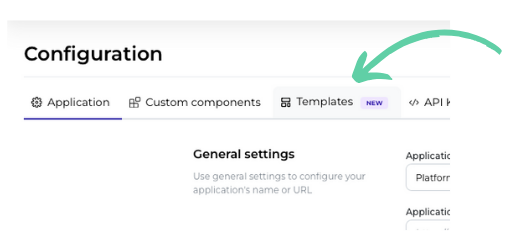
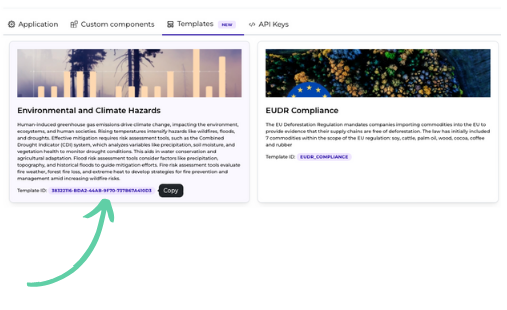
You’ll need to choose a template for generating your reports. For API usage, you'll need the template identifier, which can be obtained either by making an API call to the Get report templates endpoint, or directly from the "Templates" tab in your application settings:
Go to the application settings and select the Templates tab
Click on the selected template's ID to copy it to clipboard
For scheduling the creation of reports, you’ll use the Create project API endpoint. Assuming your project shape files are named [1-9].json, you can automate the process with a series of POST requests to schedule report creation.
Example Using Bash Script and curl:
APPLICATION_ID="123"
TEMPLATE_ID="eudr_compliance"

API_TOKEN="secret"

for project in *.json
do
  JSON=`cat ${project}`
  FEATURE=`cat ${project} | jq .feature`
  NAME=`echo ${FEATURE} | jq .properties.name`

  curl -X POST https://mjolnir.api.orbify.app/api/v2/${APPLICATION_ID}/projects/create \
    -H "X-Access-Token: ${API_TOKEN}" \
    --data '{
  "area_of_interest": ${FEATURE},
  "description": ${NAME},
  "name": ${NAME},
  "batch": true,
  "public": false,
  "report": {
    "template_id": ${TEMPLATE_ID},
    "title": ${NAME},
    "public": false,
    "inputs": {
      "start_date": "2020-01-01",
      "end_date": "2021-01-01",
    }
  }
}'
done
Example Using Python Script:
API_TOKEN = "TOKEN"
APP_ID = 123
CREATE_PROJECT_URL = f"https://mjolnir.api.orbify.app/api/v2/{APP_ID}/projects/create"
TEMPLATE_ID = "template_id"
PUBLIC = False

headers = {"X-Access-Token": API_TOKEN, "Content-Type": "application/json"}
feature = {
    "type": "Feature",
    "properties": {"name": "Some name"},
    "geometry": {
        "type": "Polygon",
        "coordinates": [
            [
                [39.09124986810417, 1.5549917777751858],
                [39.09124986810417, 1.4993540680631128],
                [39.15106981950066, 1.4993540680631128],
                [39.15106981950066, 1.5549917777751858],
                [39.09124986810417, 1.5549917777751858],
            ]
        ],
    },
}
request = {
    "area_of_interest": {"geometry": feature["geometry"], "properties": feature["properties"]},
    "description": feature["properties"]["name"],
    "name": feature["properties"]["name"],
    "public": PUBLIC,
    "report": {
        "description": feature["properties"]["name"],
        "inputs": {"start_date": "2020-12-01", "end_date": "2021-06-30"},
        "public": PUBLIC,
        "template_id": TEMPLATE_ID,
        "title": feature["properties"]["name"],
    },
    "batch": True,
}
response = requests.post(CREATE_PROJECT_URL, headers=headers, json=request)
These scripts will help you efficiently manage and create multiple reports, leveraging the power of Orbify's API to handle large batches of data with ease.
Leveraging the Orbify Platform API for batch report creation can significantly streamline your workflow, especially when dealing with large volumes of data. By preparing your project data in the correct format, selecting the appropriate report templates, and automating the scheduling process, you can efficiently generate comprehensive reports tailored to your needs. Whether using a bash script or a Python script, these tools empower you to manage and scale your reporting tasks effectively, saving both time and effort. With these steps, you're well-equipped to harness the full potential of batch operations and optimize your reporting process.
